It’s been quite some time since I finished my boids project. I never described the inner workings and logic of the program, so I figured my blog would be a great place to do just that! Check out the code on my Github repo!

Boids: An introduction
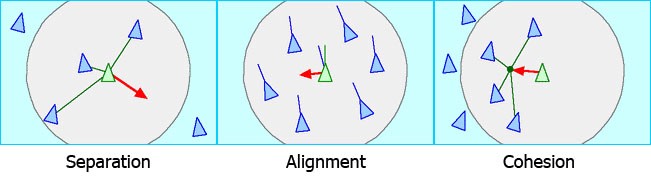
Boids are a flocking simulation which adheres to three main rules. A boid has a view range, which determines how close another boid has to be for it to be considered a neighbour. That is, if another boid is within your view range, then it is your neighbour. The three rules that then apply are illustrated in figure 1 and are:
- Separation: Personal space! Maintain a reasonable distance between yourself and your neighbours
- Alignment: Go where your neighbours are going! Travel in the same direction as your neighbours.
- Cohesion: Stay in the group! Move towards the average position of your neighbours.
The boids are simulated using several compute shaders. There are three buffers, each of length NUM_BOIDS, containing all the information about the boids: one buffer each for position, velocity and acceleration. When applying the boids algorithm, an entry in the position and velocity buffer is read for each boid, and the result is stored in the corresponding entry in the acceleration buffer. Then, after all accelerations have been calculated, the velocity and position of each boid is updated using Euler’s method:
Velocity update: v = v + a*dt
Position update: p = p + v*dt
Neighbour checking
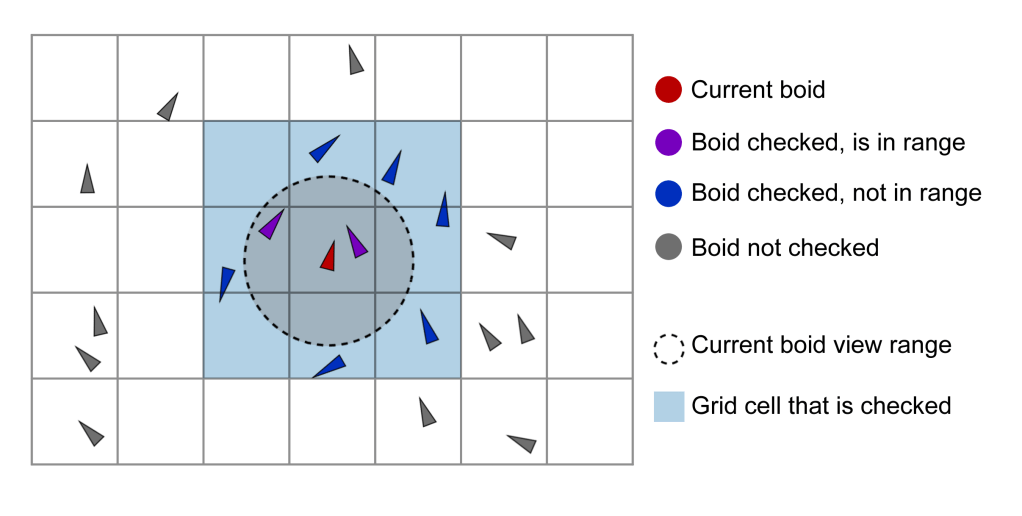
Neighbour checking is a large bottleneck for when we are simulating a lot of boids. Normally, there is a very limited subset of other boids that are actually within a boid’s view range. Without any optimizations, each boid loops through all the other boids’ positions to check whether it is within range. To reduce the amount of potential neighbours checked, the boids were sorted into a regular grid. When looking for pontential neighbours, each boid only checks the distance between itself and boids located in its current or neighbouring grid cells. This is shown in figure 2.
Optimizing neighbour checking
Helpful literature is always good to have at hand, and I used quite a few resources to figure out optimizations for neighbour checking on the boids. I got started by reading an excellent blog post by Vojtěch
Tomas on boids optimization which suggested sorting the boids into a regular grid. Further down the line, an NVIDIA presentation and the Wicked Engine devblog, both on grid-based particle optimization, proved to be valuable resources. To optimize the boids simulation, the boids are sorted based on their position in a grid. Here is a brief explanation of the major steps done each frame to enable checking all the boids in any single grid cell
- Each boid has an index in a positions buffer and is assigned to a grid cell based on this position. This is done in gridBuckets.comp
- The boids are reindexed so that boids belonging to cell n will always have a lower index than boids belonging to cell n+1. This is done in reindex.comp
- The prefix (cumulative) sum of the boid counts in the cells is calculated. This is done in prefixSum.comp. For figure 3, the prefix sum array would be
[0, 0, 1, 4, 6, 6, 7, 9, 9, 11, 11, 11, 11, 12, 12]
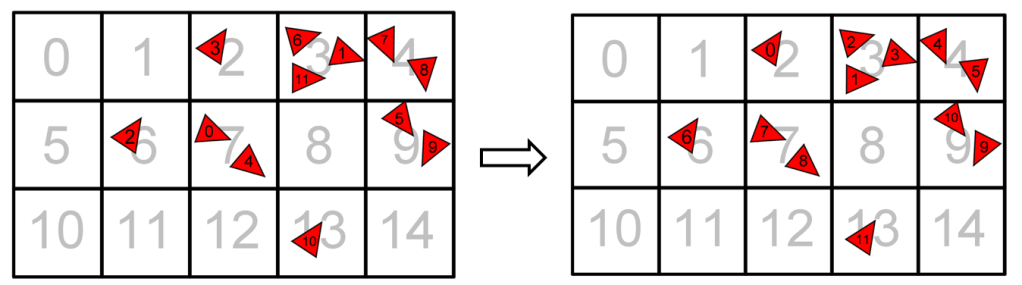
With this system in mind, going through all the boids’ positions in a cell is simply a matter of using the prefix sum array. Feel free to use the previously gven array prefixSum=[0, 0, 1, 4, 6, 6, …] together with the right side of figure 3 to see how the code snippet below works!
for i in range(prefixSum[gridCellIdx-1], prefixSum[gridCellIdx]):
        boid_position = Positions[i]
        if (boid_position != my_position):
            # apply boid rules
This concept easily extends to 3D as long as a numbering scheme for gridCellIdx in 3 dimensions is made. In 2D, 9 cells are checked and in 3D, 27 cells are checked when searching for other boids potentially in view range.
Limitations
Placing the boids inside a greatly grid improves the performance, but a current limitation is that the number of cells that boids are placed into cannot exceed 1024. This is because the prefix sum calculation
step of the boids simulation currently uses an implementation from the OpenGL Superbible. This shader uses a shared buffer of size 1024, which I think is the largest «safe» size of a shared buffer (some systems might not support shared buffers of sizes larger than 1024). Thus, the
shader has to be reworked in order for it to work with larger cell counts (which would optimize the boids simulation further).
Another limitation of the grid-sorted boids is that the worst-case performance does not improve. If all the boids are in the same/neighboring cells, then the computations take a long time and the
performance really takes a hit.
 Embla Flatlandsmo
Legg igjen en kommentar